програмиране
Anki Flashcard Generator
Creates flashcards given source pdf files.
Backend
FastAPI backend for uploading PDFs, extracting slide/page content, generating MCQ tests, and generating Anki flashcard decks.
Local development
python -m venv .venv
source .venv/bin/activate
pip install -r requirements.txt
cp .env.example .env
export OPENAI_API_KEY="your-openai-key"
python -m backend dev
Health check:
curl http://127.0.0.1:8000/health
Run tests:
PYTEST_DISABLE_PLUGIN_AUTOLOAD=1 pytest -q
Authentication
Local development defaults to AUTH_MODE=none for compatibility. Public multi-user deployments should use JWT mode:
AUTH_MODE=jwt
JWT_SECRET_KEY=replace-with-long-random-secret
JWT_ACCESS_TOKEN_EXPIRE_MINUTES=60
JWT_REFRESH_TOKEN_EXPIRE_DAYS=30
Auth endpoints:
POST /auth/register
POST /auth/login
GET  /auth/me
POST /auth/refresh
POST /auth/logout
Example:
curl -X POST http://127.0.0.1:8000/auth/register \
  -H 'Content-Type: application/json' \
  -d '{"email":"user@example.com","password":"strong-password"}'
Use the returned access token:
curl http://127.0.0.1:8000/auth/me \
  -H "Authorization: Bearer <access_token>"
Uploaded documents and background jobs are owner-scoped when auth is enabled.
Preferred production flow
Long-running work should use /jobs/... endpoints. Synchronous routes are kept for compatibility but can be disabled:
ENABLE_SYNC_GENERATION_ROUTES=false
DEPRECATE_SYNC_GENERATION_ROUTES=true
Preferred job routes:
POST /jobs/documents/{document_id}/index
POST /jobs/documents/{document_id}/extract
POST /jobs/documents/{document_id}/vision
POST /jobs/documents/{document_id}/notes
POST /jobs/documents/{document_id}/generate-test
POST /jobs/documents/{document_id}/flashcards
GET  /jobs/{job_id}
GET  /jobs/{job_id}/result
POST /jobs/{job_id}/cancel
Job statuses:
queued, running, completed, failed, cancel_requested, cancelled
Postgres and migrations
SQLite is still supported for local development. Production should use Postgres:
DATABASE_URL=postgresql+psycopg://testgen:testgen@localhost:5432/testgen
Run migrations:
python -m backend migrate
# or
alembic upgrade head
Redis/RQ jobs
Local mode runs jobs in the API process:
JOB_BACKEND=local
Production mode uses Redis/RQ:
JOB_BACKEND=rq
REDIS_URL=redis://localhost:6379/0
JOB_QUEUE_NAME=testgen
Start worker:
python -m backend worker
Rate limiting
Use Redis sliding-window limiting for production:
RATE_LIMIT_ENABLED=true
RATE_LIMIT_BACKEND=redis
RATE_LIMIT_ALGORITHM=sliding_window
AUTH_RATE_LIMIT=5/minute
UPLOAD_RATE_LIMIT=10/hour
GENERATION_RATE_LIMIT=5/hour
EXPORT_RATE_LIMIT=30/hour
REDIS_URL=redis://localhost:6379/0
Limits are keyed by authenticated user id, API key hash, or IP fallback.
OCR
Local OCR is optional and requires the Tesseract binary plus pytesseract:
sudo apt-get install tesseract-ocr
pip install -r requirements.txt
Enable OCR:
OCR_ENABLED=true
OCR_ENGINE=tesseract
OCR_LANGUAGE=eng
OCR_DPI=300
OCR_MAX_PAGES=100
OCR is used during extraction for pages with empty/weak selectable text and reports page-level job progress. If OCR is disabled, the existing vision pipeline remains available for image-heavy pages.
Cleanup
Manual cleanup:
python -m backend cleanup --dry-run --older-than 7d --verbose
python -m backend cleanup --older-than 7d
Scheduled cleanup process:
export CLEANUP_ENABLED=true
python -m backend scheduler
Relevant variables:
CLEANUP_ENABLED=true
CLEANUP_INTERVAL_MINUTES=60
UPLOAD_RETENTION_HOURS=168
EXPORT_RETENTION_HOURS=168
FAILED_JOB_RETENTION_HOURS=24
CANCELLED_JOB_RETENTION_HOURS=24
Cleanup is restricted to configured storage directories and skips documents referenced by active jobs.
CLI
python -m backend doctor
python -m backend dev
python -m backend start --host 0.0.0.0 --port 8000 --workers 2
python -m backend worker
python -m backend scheduler
python -m backend migrate
python -m backend generate --pdf ./lecture.pdf --deck-name "Biology" --output ./biology.apkg
python -m backend job status <job_id>
python -m backend job cancel <job_id>
python -m backend cleanup --dry-run --older-than 24h
python -m backend test
Old commands remain available through python -m backend.commands ....
Docker Compose
Production-style local stack:
export OPENAI_API_KEY="your-openai-key"
docker compose up --build
Services:
api— FastAPI serverworker— RQ workerscheduler— cleanup schedulerredis— queue and rate limitingpostgres— production database
Remaining production notes
- Use a real secret manager for
JWT_SECRET_KEYandOPENAI_API_KEY. - Put the API behind TLS and a reverse proxy.
- SQLite is local/dev only; production should use Postgres.
- RQ running-job cancellation is safe/cooperative plus RQ stop-command based; it does not kill OS processes directly.
Frontend
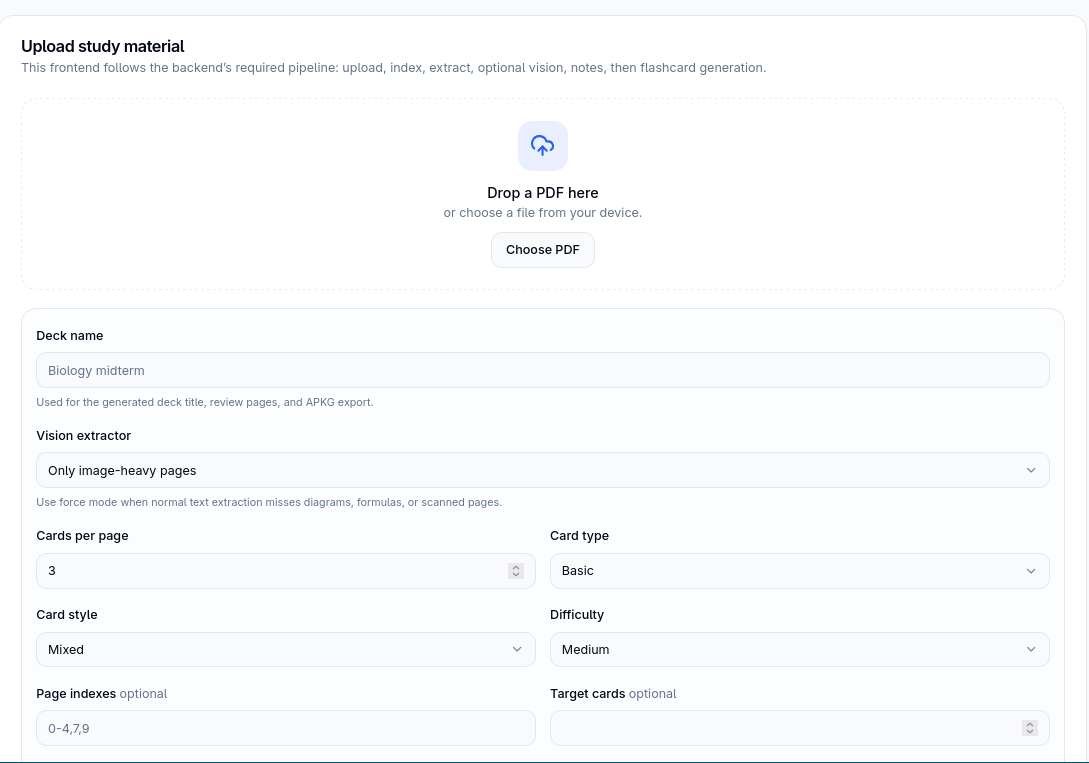
React + TypeScript frontend for the FastAPI backend. It runs the full PDF preparation pipeline before starting flashcard generation.
What this frontend calls
For PDF → Anki generation it uses this backend-compatible flow:
POST /documentsPOST /jobs/documents/:documentId/index- poll
GET /jobs/:jobIduntil complete POST /jobs/documents/:documentId/extract- poll
GET /jobs/:jobIduntil complete GET /documents/:documentId/slideswhen vision mode isneeded- optionally
POST /jobs/documents/:documentId/vision - poll
GET /jobs/:jobIduntil complete POST /jobs/documents/:documentId/notes- poll
GET /jobs/:jobIduntil complete POST /jobs/generatewith supported flashcard payload keys- poll final job, then load cards and diagnostics
- download APKG with
GET /documents/:documentId/flashcards/:filename/apkg
The frontend passes selected page filters through every preparation step, so large PDFs can be processed chapter-by-chapter. Page filters are zero-based, for example 0-4,7,9.
Vision extraction can be disabled, run only for image-heavy pages, or forced for all selected pages.
Frontend setup
cd frontend
npm install
cp .env.example .env
npm run dev
.env:
VITE_API_BASE_URL=http://localhost:8000
Open:
http://localhost:5173
Backend setup for JWT auth
For account registration/login, the backend must run with JWT auth:
cd /home/xpucko/Documents/testgen
source .venv/bin/activate

export AUTH_MODE=jwt
export JWT_SECRET_KEY=replace_with_long_random_secret
export CORS_ORIGINS=http://localhost:5173,http://127.0.0.1:5173
export JOB_BACKEND=local

set -a
source backend/.env
set +a

cd backend
python -m backend dev
If your backend .env has AUTH_MODE=none, use Continue in local dev mode on the login page. In that mode the frontend skips /auth/me as a hard dependency and uses the backend’s unauthenticated local behavior.
Backend dependency note
If registration crashes with bcrypt/passlib on Python 3.14 or bcrypt 5.x, pin bcrypt:
source .venv/bin/activate
pip uninstall bcrypt -y
pip install "bcrypt==4.0.1"
Recommended Python version for the backend: 3.11 or 3.12.
APKG export and edited cards
The provided backend can download APKG from the generated JSON file, but it has no endpoint for saving locally edited cards before APKG creation. Therefore:
- CSV and JSON exports use local edits.
- APKG export uses the backend-generated deck file. Започни с полезната част.